
 Sky Duty
Scheduling and Maintenance Software for Flying Clubs
One board for every member, with each squawk on that airplane’s own list.
$39 per aircraft per month
 No card needed.
Free for 14 days with up to 2 aircraft.
Sky Duty runs on iPhone and iPad. Scan to get it.
- $39 per aircraft per month
- Unlimited users
- 14-day free trial in the app
- iPhone and iPad
One shared schedule every member can see, squawks, trip-based cost sharing and member roles, on iPhone and iPad.
Reviewed


Demo operation. Fictional people and tails.
The whole month on one screen: the club’s schedule on iPhone, every trip a route chip (demo, October 2026).
Fleet math
$117 a month
or $1,287 a year (one month free)
Start the trial with two of your aircraft, then add the rest of the fleet when you subscribe.
One board that flags a clash
A flying club shares a handful of aircraft among a lot of members, and the pain is always the same: two members after the same airplane on the same weekend, no idea who flew last or left it low on fuel, a squawk lost in a group text, and a year-end scramble to split costs.
Read the rest
Sky Duty puts every club aircraft on one board with conflict detection and shares each aircraft’s schedule as an ICS calendar feed that any member can subscribe to in their own calendar app, and the paper sheet goes away.
- Day, 3-Day and Week on iPad; Month, Week and Day on iPhone
- The schedule is on the device, so it is there even at fields with no signal
Flight Scheduling
See the Gantt timeline and conflict detection
Honest about the edges
Sky Duty runs the club’s shared schedule, squawks and costs. Dues, member payments and your EFB stay where they are.
What Sky Duty does
- Flags a clash before you confirm the trip.
- Shows what’s due by date, hours or cycles.
What it doesn’t do
- Sky Duty organizes and exports shared costs so the treasurer can split them fairly, but it is not a dues-billing or member-payment system: it does not collect member dues or process club payments.
- Members’ logged flights hold the landings and approaches they check currency from, which is a convenience, not a substitute for each pilot’s own record-keeping obligations.
- It is not an electronic flight bag: keep your EFB for charts, weather briefings, and navigation.
Report a squawk before the next member flies
Any member can file a squawk with a photo from the post-flight screen, tied to the aircraft and flight, or a quick squawk in flight.
Inspection countdowns
Inspection countdowns track the annual and 100-hour by date, hours, or cycles, with a due, overdue, and grounded view — so the next member sees the aircraft’s real status before they take it.
The draft squawk
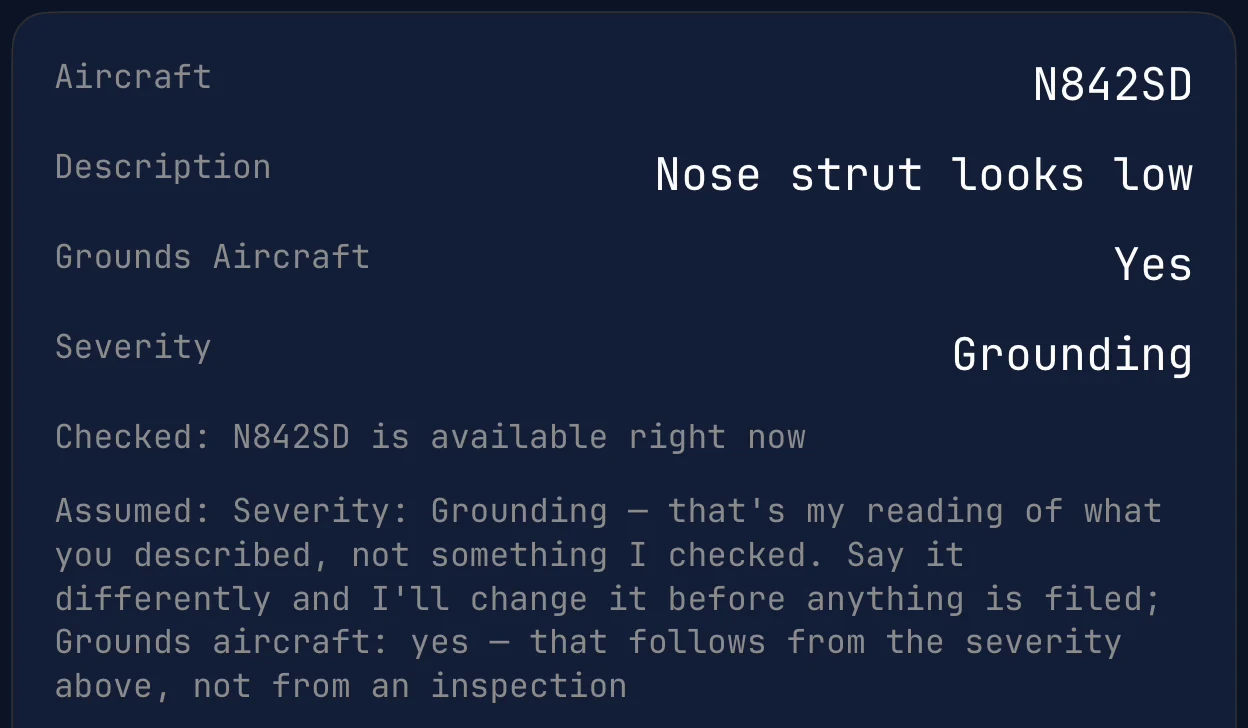
After Confirm, on the Schedule
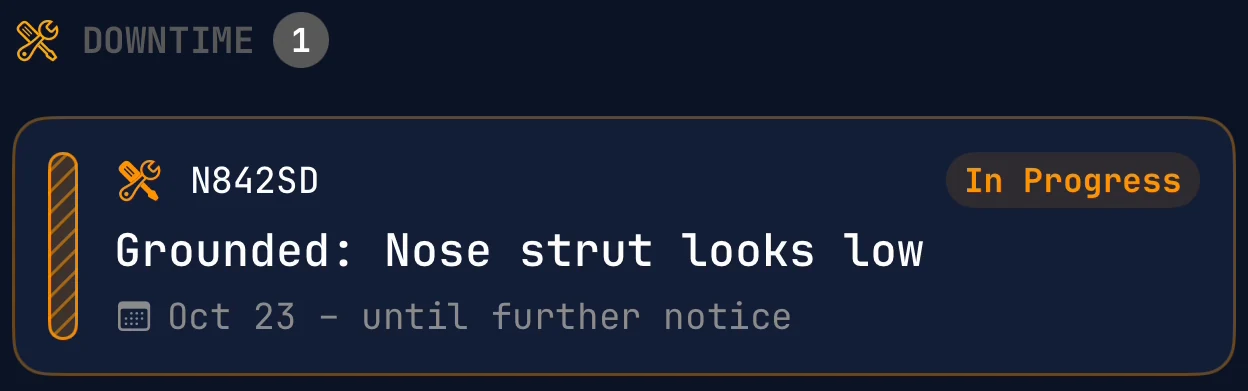


Demo operation. Fictional people and tails.
A member reports it, and the AI assistant drafts the grounding squawk. Shown on the demo fleet’s Citation CJ4; a club airplane is grounded the same way. Nothing changes until you confirm.
Put a grounded aircraft on a trip and the trip form flags it as grounded; the trip saves only after you choose to override.


Demo operation. Fictional people and tails.
What’s due on one airplane: its 100-hour in 8 hrs, its annual in 43 days (demo N728SD, a Cessna 172S).


- N728SD · 1 due soon · Next: 100-Hour Inspection
- 100-Hour Inspection · 8 hrs remaining
- Due Soon
What’s due on one airplane (demo N728SD, a Cessna 172S).
Transcript: The maintenance list flags N728SD, a Cessna 172S Skyhawk SP, with 1 due soon. On its Status tab the next member sees the Annual Inspection at 43 days remaining and the 100-Hour Inspection due soon, with 8 hrs remaining.
- N728SD: 1 due soon
- Annual: 43 days remaining
- 100-Hour: 8 hrs, Due Soon
- Oil Change: 40 hrs remaining
- Full maintenance history per tail number
Maintenance Tracking
Squawks, inspection countdowns, and status

One trip’s costs in the app: trip #636, six expenses, $2,200.63.
Transcript: Trip #636, Oct 9 from KAPA to KSDL, holds six expenses for $2,200.63: fuel, catering, a landing fee, overnight ramp, a crew hotel and a rideshare, each with its own amount and category.
Every cost tied to the trip that generated it
Snap a fuel or FBO receipt and Sky Duty drafts the merchant, amount, and date for you to check, then links it to the trip.
Splitting the costs
Group expenses by trip and export to PDF or CSV, so cost-sharing is based on what a flight actually cost rather than a rough estimate on a whiteboard. Multi-currency covers cross-border trips.

One role’s permission grid in the app: the Mechanic can view trip assignments and flight logs but not create, edit or delete them.
Transcript: Roles & Permissions lists Owner, Admin, Dispatcher, Pilot (PIC), Pilot (SIC), Flight Instructor, Flight Attendant and Mechanic. Opening Mechanic shows its grid by area; under Expenses, View moves from Personal to All, from a menu of None, Personal, Team and All.
Give every member the right access
A club is members, a board, a maintenance officer, and a treasurer — and they should not all have the same access.
How the roles split the work
Sky Duty ships built-in roles, each with its own permission grid, so a member schedules and logs while an officer works maintenance or admin, each in their own slice of the same records.
- Built-in roles: Owner, Admin, Pilot, and Mechanic
- Each member’s logged landings, approaches, and hours
Fleet & Crew
Aircraft profiles, roles, and permissions
Per aircraft, every member included
Sky Duty is $39 per aircraft per month, with a 14-day free trial and unlimited users. Running 4 or more aircraft? See the pricing page, or talk to the team: a person answers. The trial starts in the app.
Or email info@skyduty.com
Who is included
A club pays for its shared aircraft and adds every member, plus the maintenance officer and treasurer, at no extra seat cost.
No card needed.Free for 14 days with up to 2 aircraft.
Before you start
Co-founded by a working pilot
Your data is yours
Logbook export to PDF or CSV, and logbook import from CSV. Delete your account or organization in the app. Your data is never used to train AI models.
It won’t sign off maintenance. Weather is advisory.
Frequently asked questions
What is flying club scheduling software?
Can club members see each other’s trips?
How does Sky Duty handle shared aircraft costs?
Does Sky Duty charge per member?
Can club members report maintenance squawks?
Can I trial my whole fleet?
Part of your flight department system
A flying club is a small flight department, and the same app that runs a corporate fleet runs a club. Your schedule, squawks, costs, and roles are all part of your flight department software, the complete system of record — one app instead of a sign-up sheet, a text thread, and a spreadsheet.
Go deeper: 3 more pages
One board and one squawk list for every member
$39 per aircraft per month. Start the trial in the app.

Sky Duty runs on iPhone and iPad. Scan to get it.