
 Sky Duty
AI for pilots. It drafts. You confirm.
Tap Ask Sky Duty and ask in plain language. It drafts the change and shows what it checked. Nothing changes until you confirm.

14-day free trial in the app · iPhone and iPad
- ASK
- “Schedule N519SD from KPHX to KAPA on Wednesday, November 4 at 8am Phoenix time, Jamie Cole as PIC.”
- CHECKED
- Found 1 aircraft conflict and 1 crew conflict
- ASK
- “Make it Thursday, November 5 at 8 instead.”
- CHECKED
- No aircraft or crew conflicts
- YOU
- Tap Confirm.
- RESULT
- Trip #659 created — N519SD.
| Day | Time | From | To | Tail | Pic | Status |
|---|---|---|---|---|---|---|
| WED 04 | 0800 | Not shown | Not shown | N519SD | Not shown | Scheduled |
| THU 05 | 0800 | KPHX | KAPA | N519SD | COLE | Scheduled |
Your flight department, on one board. Demo operation. Fictional people and tails.


Read the full exchange
- 00.0ASK“Schedule N519SD from KPHX to KAPA on Wednesday, November 4 at 8am Phoenix time, Jamie Cole as PIC.”
- 00.5DRAFTDeparts Nov 4, 2026 at 8:00 AM MST
- 01.3DRAFTChecked Found 1 aircraft conflict and 1 crew conflict
- 03.4ASK“Make it Thursday, November 5 at 8 instead.”
- 03.5DRAFTDeparts Nov 5, 2026 at 8:00 AM MST
- 04.2DRAFTChecked No aircraft or crew conflicts
- 06.8YOUConfirm
- 07.2RESULTTrip #659 created — N519SD.
Transcript: Prompt: “Schedule N519SD from KPHX to KAPA on Wednesday, November 4 at 8am Phoenix time, Jamie Cole as PIC.” The card shows KPHX → KAPA, aircraft N519SD, departs Nov 4, 2026 at 8:00 AM MST, PIC Jamie Cole. Checked: Found 1 aircraft conflict and 1 crew conflict. Prompt: “Make it Thursday, November 5 at 8 instead.” The new card shows Nov 5, 2026 at 8:00 AM MST. Checked: No aircraft or crew conflicts. Worked out: Read as 08:00 MST at KPHX — you said “Phoenix time” earlier. Assumed: nothing. Confirm. “Trip #659 created — N519SD.”
Ten jobs, each one filmed in the app.
Tap a job to play its clip. Each one is a real recording of the app with the demo operation.
Schedule a trip. One sentence. It drafts the trip; you confirm.
Typed request: “Schedule N519SD from KPHX to KAPA on Friday, November 6 at nine Phoenix time, me as PIC, Riley Park as SIC.”
- DRAFT
- KPHX → KAPA · N519SD · Nov 6, 2026 at 9:00 AM MST · PIC Casey Holt · SIC Riley Park
- CHECKED
- No aircraft or crew conflicts · N519SD is not grounded
- YOU
- Tap Confirm.
- BOARD
- DEPARTURES · 06 NOV 0900 · KPHX → KAPA · N519SD · HOLT · CREW ASSIGNED
- RESULT
- Trip #654 created — N519SD.
Transcript: Prompt: “Schedule N519SD from KPHX to KAPA on Friday, November 6 at nine Phoenix time, me as PIC, Riley Park as SIC.” The draft card shows KPHX → KAPA, aircraft N519SD, departs Nov 6, 2026 at 9:00 AM MST, PIC Casey Holt, SIC Riley Park, Pilatus PC-12 NGX. Checked: No aircraft or crew conflicts. Checked: N519SD has no maintenance scheduled in that window. Checked: N519SD is not grounded. Worked out: Read as 09:00 MST at KPHX — you said “Phoenix time”. Assumed: nothing. Confirm. “Trip #654 created — N519SD.” Friday's schedule now lists KPHX → KAPA on N519SD, PIC You, SIC Riley Park, 9:00 AM MST.

Demo operation. Fictional people and tails. Sequences shortened.
Read the full exchange: Schedule a trip
- 00.0ASK“Schedule N519SD from KPHX to KAPA on Friday, November 6 at nine Phoenix time, me as PIC, Riley Park as SIC.”
- 00.7DRAFTKPHX → KAPA
- 01.9DRAFTAircraft N519SD
- 02.6DRAFTDeparts Nov 6, 2026 at 9:00 AM MST
- 03.4DRAFTPIC Casey Holt
- 04.1DRAFTSIC Riley Park
- 05.6DRAFTChecked No aircraft or crew conflicts
- 06.6DRAFTChecked N519SD is not grounded
- 08.6YOUConfirm
- 08.6BOARDDEPARTURES · 06 NOV 0900 · KPHX → KAPA · N519SD · HOLT · CREW ASSIGNED
- 09.6RESULTTrip #654 created — N519SD.
- 13.2APPSchedule KPHX → KAPA · N519SD · Riley Park · 9:00 AM MST
Move it. The card shows the old time struck through and the new one. You confirm.
Typed request: “Move my KPHX to KSAN trip on October 27 to 10:30 Phoenix time.”
- DRAFT
- #645 · KPHX → KSAN · Tue, Oct 27 10:30 MST at KPHX
- CHECKED
- 2 crew on this trip · No aircraft or crew conflicts at the new time
- YOU
- Tap Confirm.
- BOARD
- DEPARTURES · 27 OCT · KPHX → KSAN · N519SD · TIME 0730 → 1030
- RESULT
- Trip #645 updated — departure now Tue, Oct 27 10:30 MST at KPHX.
Transcript: The Schedule shows #645, KPHX → KSAN on N519SD, at 7:30 AM MST. Prompt: “Move my KPHX to KSAN trip on October 27 to 10:30 Phoenix time.” The card shows #645 · KPHX → KSAN, departure Tue, Oct 27 07:30 MST struck through and replaced by Tue, Oct 27 10:30 MST at KPHX. Checked: 2 crew on this trip. Checked: No aircraft or crew conflicts at the new time. Confirm. “Trip #645 updated — departure now Tue, Oct 27 10:30 MST at KPHX.” The Schedule now shows #645 at 10:30 AM MST.

Demo operation. Fictional people and tails. Sequences shortened.
Read the full exchange: Move it
- 00.0ASK“Move my KPHX to KSAN trip on October 27 to 10:30 Phoenix time.”
- 00.5DRAFT#645 · KPHX → KSAN
- 01.3DRAFTDeparts Tue, Oct 27 10:30 MST at KPHX
- 02.0DRAFTChecked 2 crew on this trip
- 03.0DRAFTChecked No aircraft or crew conflicts at the new time
- 05.3YOUConfirm
- 05.3BOARDDEPARTURES · 27 OCT · KPHX → KSAN · N519SD · TIME 0730 → 1030
- 06.2RESULTTrip #645 updated — departure now Tue, Oct 27 10:30 MST at KPHX.
- 07.4APPSchedule 10:30 AM MST
Catch the clash. The draft says what conflicts. Change the day in a sentence and it checks again.
Typed request: “Schedule N519SD from KPHX to KAPA on Wednesday, November 4 at 8am Phoenix time, Jamie Cole as PIC.”
- CHECKED
- Found 1 aircraft conflict and 1 crew conflict
- ASK
- “Make it Thursday, November 5 at 8 instead.”
- CHECKED
- No aircraft or crew conflicts
- YOU
- Tap Confirm.
- BOARD
- DEPARTURES · 05 NOV 0800 · KPHX → KAPA · N519SD · COLE · SCHEDULED
- RESULT
- Trip #659 created — N519SD.
Transcript: Prompt: “Schedule N519SD from KPHX to KAPA on Wednesday, November 4 at 8am Phoenix time, Jamie Cole as PIC.” The card shows KPHX → KAPA, aircraft N519SD, departs Nov 4, 2026 at 8:00 AM MST, PIC Jamie Cole. Checked: Found 1 aircraft conflict and 1 crew conflict. Prompt: “Make it Thursday, November 5 at 8 instead.” The new card shows Nov 5, 2026 at 8:00 AM MST. Checked: No aircraft or crew conflicts. Worked out: Read as 08:00 MST at KPHX — you said “Phoenix time” earlier. Assumed: nothing. Confirm. “Trip #659 created — N519SD.”
Demo operation. Fictional people and tails. Sequences shortened.
Read the full exchange: Catch the clash
- 00.0ASK“Schedule N519SD from KPHX to KAPA on Wednesday, November 4 at 8am Phoenix time, Jamie Cole as PIC.”
- 00.5DRAFTDeparts Nov 4, 2026 at 8:00 AM MST
- 01.3DRAFTChecked Found 1 aircraft conflict and 1 crew conflict
- 03.4ASK“Make it Thursday, November 5 at 8 instead.”
- 03.5DRAFTDeparts Nov 5, 2026 at 8:00 AM MST
- 04.2DRAFTChecked No aircraft or crew conflicts
- 06.8YOUConfirm
- 06.8BOARDDEPARTURES · 05 NOV 0800 · KPHX → KAPA · N519SD · COLE · SCHEDULED
- 07.2RESULTTrip #659 created — N519SD.
Ground it. It drafts the grounding; you confirm. It won't sign off maintenance.
Typed request: “The nose strut looks low on N842SD, don't let anyone fly it.”
- DRAFT
- N842SD · Nose strut looks low · Severity: Grounding
- ASSUMED
- …my reading of what you described, not something I checked
- YOU
- Tap Confirm.
- BOARD
- FLEET · N842SD · AVAILABLE → GROUNDED
- RESULT
- Done.
- ASK
- “It's fixed.”
To clear a defect and return N842SD to service, a maintenance record must be logged directly on the Maintenance screen in the app.
A maintenance sign-off is a formal attestation that cannot be submitted through the assistant.
Transcript: Prompt: “The nose strut looks low on N842SD, don't let anyone fly it.” The card shows Aircraft N842SD, Description “Nose strut looks low”, Grounds Aircraft Yes, Severity Grounding. Assumed: “Severity: Grounding — that's my reading of what you described, not something I checked.” The card says it grounds N842SD. Confirm. “Done.” Then: “It's fixed.” The answer: “To clear a defect and return N842SD to service, a maintenance record must be logged directly on the Maintenance screen in the app. A maintenance sign-off is a formal attestation that cannot be submitted through the assistant. If the squawk was reported in error rather than repaired, let me know and I can close it.” The Schedule shows DOWNTIME · N842SD · In Progress · Grounded: Nose strut looks low · Oct 23 – until further notice.

Demo operation. Fictional people and tails. Sequences shortened.
Read the full exchange: Ground it
- 00.0ASK“The nose strut looks low on N842SD, don't let anyone fly it.”
- 01.8DRAFTAircraft N842SD
- 02.5DRAFTDescription Nose strut looks low
- 03.2DRAFTSeverity Grounding
- 04.7DRAFTAssumed …my reading of what you described, not something I checked
- 05.7DRAFTGrounds It cannot be scheduled until a maintenance record clears it.
- 07.7YOUConfirm
- 07.7BOARDFLEET · N842SD · AVAILABLE → GROUNDED
- 08.8RESULTDone.
- 09.9ASK“It's fixed.”
- 10.4REPLY…a maintenance record must be logged directly on the Maintenance screen in the app
- 11.4REPLY…cannot be submitted through the assistant
- 12.7REPLYGrounded Nose strut looks low · until further notice
Schedule the annual. It drafts the downtime and lists the trips in that window. You confirm.
Typed request: “Put N846SD down for its annual from October 30 to November 3 at KAPA.”
- DRAFT
- N846SD — Beechcraft King Air 350i · Starts Fri, Oct 30 · Ends Tue, Nov 3 · Annual Inspection
- ASSUMED
- …nothing
- WORKED OUT
- Dates read on the KAPA clock (America/Denver)
- YOU
- Tap Confirm.
- BOARD
- FLEET · N846SD · DUE SOON → MX DOWNTIME · ANNUAL · OCT 30-NOV 3
- RESULT
- Done
Transcript: Prompt: “Put N846SD down for its annual from October 30 to November 3 at KAPA.” The card shows Aircraft N846SD — Beechcraft King Air 350i, Facility KAPA, Starts Fri, Oct 30, Ends Tue, Nov 3, Title Annual Inspection. Checked: N846SD — Beechcraft King Air 350i is on this fleet. Checked: 2 trips in this window: KAPA-KASE Fri, Oct 30; KASE-KAPA Sun, Nov 1. Assumed: nothing. Confirm. The result line confirms N846SD out of service Oct 30 – Nov 3 at KAPA. The Schedule shows DOWNTIME · N846SD · Annual Inspection · Scheduled · Oct 30 – Nov 3.

Demo operation. Fictional people and tails. Sequences shortened.
Read the full exchange: Schedule the annual
- 00.0ASK“Put N846SD down for its annual from October 30 to November 3 at KAPA.”
- 00.6DRAFTAircraft N846SD — Beechcraft King Air 350i
- 01.8DRAFTStarts Fri, Oct 30
- 02.5DRAFTEnds Tue, Nov 3
- 03.2DRAFTTitle Annual Inspection
- 04.7DRAFTAssumed nothing
- 05.7DRAFTWorked out Dates read on the KAPA clock (America/Denver)
- 07.6YOUConfirm
- 07.6BOARDFLEET · N846SD · DUE SOON → MX DOWNTIME · ANNUAL · OCT 30-NOV 3
- 08.2RESULTDone
- 09.4APPDOWNTIME · N846SD · Annual Inspection · Oct 30 – Nov 3
What's due. It lists what is coming due on the tail, by date and by Hobbs hours.
Typed request: “What's coming due on N846SD?”
Annual Inspection: due 2026-11-03 (11 days remaining)
Phase 1 Inspection: due at 6884.5 Hobbs (47.3 hours remaining)
Fire Extinguisher Service: due 2026-12-24 (62 days remaining)
Transcript: Prompt: “What's coming due on N846SD?” The answer: “Upcoming maintenance due on N846SD: Annual Inspection: due 2026-11-03 (11 days remaining); Phase 1 Inspection: due at 6884.5 Hobbs (47.3 hours remaining); Fire Extinguisher Service: due 2026-12-24 (62 days remaining).”

Demo operation. Fictional people and tails. Sequences shortened.
Read the full exchange: What's due
- 00.0ASK“What's coming due on N846SD?”
- 00.8REPLYAnnual Inspection due 2026-11-03 (11 days remaining)
- 01.8REPLYPhase 1 Inspection 47.3 hours remaining
- 02.8REPLYFire Extinguisher Service 62 days remaining
Landed. The card lists what will change: the status, and a new logbook draft for the PIC. You confirm.
Typed request: “We just landed in Colorado Springs.”
- DRAFT
- Landed: When you approve · In flight → Landed · Logbook Entry: New draft for the pilot in command
- YOU
- Tap Confirm.
- BOARD
- DEPARTURES · 23 OCT · KAPA → KCOS · N728SD · IN FLIGHT → LANDED·LOGGED
- RESULT
- Done.
- LOGBOOK
- KAPA → KCOS · N728SD #129 · 0.4 hrs
Transcript: Prompt: “We just landed in Colorado Springs.” The landing card shows KAPA → KCOS, departed Oct 23, 2026 at 11:02 AM MDT; Landed: When you approve; Logbook Entry: New draft for the pilot in command; Status: In flight → Landed; Tail Number N728SD. Confirm. “Done.” The trip card on the Schedule now reads Completed #129. In the Logbook the new entry is the top row: KAPA → KCOS, N728SD #129, Casey Holt PIC, 0.4 hrs. Flight Details: departure 11:02 AM MDT, arrival 11:28 AM MDT, N728SD Cessna 172S Skyhawk SP.

Demo operation. Fictional people and tails. Sequences shortened.
Read the full exchange: Landed
- 00.0ASK“We just landed in Colorado Springs.”
- 01.7DRAFTLanded When you approve
- 02.5DRAFTStatus In flight → Landed
- 03.9DRAFTLogbook Entry New draft for the pilot in command
- 06.2YOUConfirm
- 06.2BOARDDEPARTURES · 23 OCT · KAPA → KCOS · N728SD · IN FLIGHT → LANDED·LOGGED
- 07.1RESULTDone.
- 08.4APPKAPA → KCOS · N728SD · 11:05 AM MDT
- 09.7APPKAPA → KCOS · N728SD #129 · 0.4 hrs
- 12.2APPDeparture 11:02 AM MDT
- 13.2APPArrival 11:28 AM MDT
Log it. It drafts the logbook entry; you confirm. Undo is on the result.
Typed request: “Log a flight: N728SD, KCOS to KAPA, 0.8 hours, two landings.”
- DRAFT
- KCOS → KAPA · Aircraft N728SD · Landings Day 2 · Total time 0.80
- ASSUMED
- …nothing
- YOU
- Tap Confirm.
- BOARD
- DEPARTURES · 23 OCT ---- · KCOS → KAPA · N728SD · HOLT · LANDED·LOGGED
- RESULT
- Flight logged.
Transcript: Prompt: “Log a flight: N728SD, KCOS to KAPA, 0.8 hours, two landings.” The card shows KCOS → KAPA, Aircraft N728SD, Date 2026-10-23, Landings Day 2, Total time 0.80. Worked out: Logged as 0.8h total; no departure/arrival clock times were given. Assumed: nothing. Confirm. “Flight logged.” with Undo. The Logbook totals read 132.5 hrs, 101 flights, 130 landings.

Demo operation. Fictional people and tails. Sequences shortened.
Read the full exchange: Log it
- 00.0ASK“Log a flight: N728SD, KCOS to KAPA, 0.8 hours, two landings.”
- 00.5DRAFTKCOS → KAPA
- 01.8DRAFTAircraft N728SD
- 02.5DRAFTLandings Day 2
- 03.2DRAFTTotal time 0.80
- 04.7DRAFTAssumed nothing
- 06.8YOUConfirm
- 06.8BOARDDEPARTURES · 23 OCT ---- · KCOS → KAPA · N728SD · HOLT · LANDED·LOGGED
- 07.3RESULTFlight logged.
Weather. It names the source and the observation time, then decodes it. Advisory weather only.
Typed request: “METAR and TAF for KAPA”
KAPA (Centennial Airport) — NOAA Aviation Weather Center
Observed 14:53Z (42 min old, stale)
Flight Category: VFR · Wind: 020° at 6 kt, gusts to 14 kt
Advisory weather only.
Transcript: Prompt: “METAR and TAF for KAPA”. The answer names its source, KAPA (Centennial Airport) — NOAA Aviation Weather Center, and the observation time, 14:53Z (42 min old). It shows the raw METAR and decodes it: Flight Category: VFR; Wind: 020° at 6 kt, gusts to 14 kt; Visibility: 10+ SM; Sky: FEW at 9,000 ft AGL, FEW at 14,000 ft AGL; Temp / Dewpoint: 17°C / 3°C; Altimeter: 29.99 inHg. Then the raw TAF issued 23 Oct 11:36Z, and the last line: “Advisory weather only.”

Demo operation. Fictional people and tails. Sequences shortened.
Read the full exchange: Weather
- 00.0ASK“METAR and TAF for KAPA”
- 01.8REPLYKAPA (Centennial Airport) — NOAA Aviation Weather Center
- 02.8REPLYObserved 14:53Z · 42 min old
- 03.8REPLYFlight Category VFR · Wind: 020° at 6 kt, gusts to 14 kt
- 04.8REPLYAdvisory weather only.
Zulu. It converts your local departure to Zulu and shows the time zone it used.
Typed request: “What's the Zulu time for my 9am KPHX departure on November 6?”
For a 09:00 MST departure at KPHX on Friday, November 6, 2026:
1600Z
Computed: 1600Z in America/Phoenix (MST, UTC-7)
Transcript: Prompt: “What's the Zulu time for my 9am KPHX departure on November 6?” The answer: “For a 09:00 MST departure at KPHX on Friday, November 6, 2026: 1600Z.” Computed: 1600Z in America/Phoenix (MST, UTC-7).

Demo operation. Fictional people and tails. Sequences shortened.
Read the full exchange: Zulu
- 00.0ASK“What's the Zulu time for my 9am KPHX departure on November 6?”
- 00.8REPLYFor a 09:00 MST departure at KPHX on Friday, November 6, 2026
- 02.3REPLY1600Z
- 03.8REPLYComputed 1600Z in America/Phoenix (MST, UTC-7)
| Date | Time | From | To | Tail | Pic | Status |
|---|---|---|---|---|---|---|
| 23 OCT | 1102 | KAPA | KCOS | N728SD | HOLT | Landed, logged |
| 23 OCT | Not shown | KCOS | KAPA | N728SD | HOLT | Landed, logged |
| 27 OCT | 1030 | KPHX | KSAN | N519SD | HOLT | Crew assigned |
| 04 NOV | 0800 | Not shown | Not shown | N519SD | Not shown | Scheduled |
| 05 NOV | 0800 | KPHX | KAPA | N519SD | COLE | Scheduled |
| 06 NOV | 0900 | KPHX | KAPA | N519SD | HOLT | Crew assigned |
| Tail | Item | Status |
|---|---|---|
| N842SD | Not shown | Grounded |
| N846SD | ANNUAL · OCT 30-NOV 3 | Maintenance downtime |
It drafts. You decide.
Every change arrives as a draft card. What it filled in is on the card, field by field, with what it checked and what it assumed.

Typed request: “Schedule N728SD from KAPA to KCOS on Wednesday, November 18 at 3pm Denver time, me as PIC.”
- DRAFT
- KAPA → KCOS · Nov 18, 2026 at 3:00 PM MST · Cessna 172S Skyhawk SP
- CHECKED
- No aircraft or crew conflicts
- WORKED OUT
- Read as 15:00 MST at KAPA — you said "Denver time"
- YOU
- Tap Discard.
- RESULT
- Discarded — nothing was changed.
- APP
- No flights scheduled for this day.
Read the full exchange
- 00.0ASK“Schedule N728SD from KAPA to KCOS on Wednesday, November 18 at 3pm Denver time, me as PIC.”
- 00.5DRAFTKAPA → KCOS
- 01.7DRAFTDeparts Nov 18, 2026 at 3:00 PM MST
- 02.4DRAFTType Cessna 172S Skyhawk SP
- 03.9DRAFTChecked No aircraft or crew conflicts
- 04.9DRAFTWorked out Read as 15:00 MST at KAPA — you said "Denver time"
- 06.9YOUDiscard
- 07.0RESULTDiscarded — nothing was changed.
- 08.3APPNo flights scheduled for this day.
Nothing changes until you confirm.
Confirm it, or discard it.
- CONFIRM
- “Trip #654 created — N519SD.”
- DISCARD
- “Discarded — nothing was changed.”
Discard, and the app says so. The day stays as it was.
Transcript: Prompt: “Schedule N728SD from KAPA to KCOS on Wednesday, November 18 at 3pm Denver time, me as PIC.” The draft card shows KAPA → KCOS, aircraft N728SD, departs Nov 18, 2026 at 3:00 PM MST, PIC Casey Holt, Cessna 172S Skyhawk SP. Checked: No aircraft or crew conflicts. Checked: N728SD has no maintenance scheduled in that window. Checked: N728SD is not grounded. Worked out: Read as 15:00 MST at KAPA — you said “Denver time”. Assumed: nothing. Discard. “Discarded — nothing was changed.” Back on the Schedule, Nov 18 still reads “No flights scheduled for this day.”
It asks when something's missing.
Leave the aircraft out, and it asks “Which aircraft?” with your fleet’s tails as buttons.

Anything it assumed is on the card, under “Assumed:”.
It shows what it checked.
It checks for aircraft and crew conflicts and says what it checked.
BEFORE
Typed request: “Schedule N519SD from KPHX to KAPA on Wednesday, November 4 at 8am Phoenix time, Jamie Cole as PIC.”
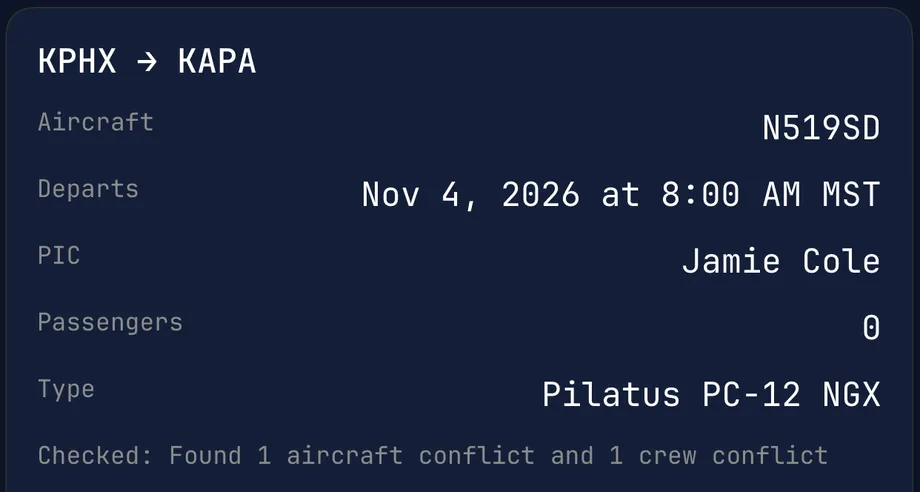
- DepartsNov 4, 2026 at 8:00 AM MST
- CheckedFound 1 aircraft conflict and 1 crew conflict
AFTER
Typed request: “Make it Thursday, November 5 at 8 instead.”
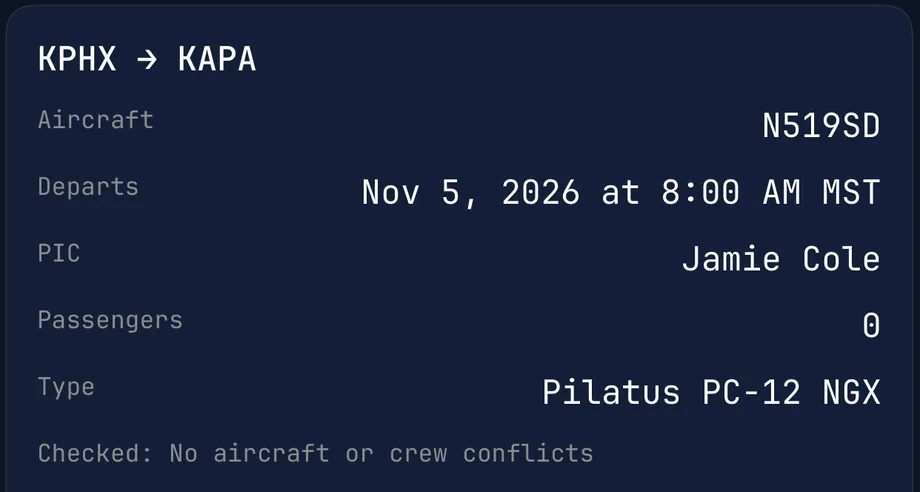
- DepartsNov 5, 2026 at 8:00 AM MST
- CheckedNo aircraft or crew conflicts
- ConfirmTrip #659 created — N519SD.


Demo operation. Fictional people and tails.

Undo.
Undo is on the card when a change can be undone. When it can’t, the card says so.
Typed request: “Fuel receipt from today, put it on N846SD trip 641.”
- DRAFT
- $671.23 · Fuel · Fri, Oct 16 · HIGH MESA FBO
- CHECKED
- Read 1 file
- TRIP
- #641 KPHX → KAPA, Fri, Oct 16
- YOU
- Tap Confirm.
- RESULT
- Added 1 of 1 receipt.
- YOU
- Tap Undo.
- YOU
- Tap Confirm.
- RESULT
- Removed 1 row.
Read the full exchange
- 00.0ASK“Fuel receipt from today, put it on N846SD trip 641.”
- 01.7DRAFTAmount $671.23
- 02.4DRAFTCategory Fuel
- 03.1DRAFTDate Fri, Oct 16
- 03.9DRAFTVendor HIGH MESA FBO
- 05.4DRAFTChecked Read 1 file
- 06.4DRAFTTrip #641 KPHX → KAPA, Fri, Oct 16
- 08.2YOUConfirm
- 09.4RESULTAdded 1 of 1 receipt.
- 11.1YOUUndo
- 12.7YOUConfirm
- 13.0RESULTRemoved 1 row.
- 14.3APPExpenses $110,053.98 · 176
Transcript: A fuel receipt photo is attached, then: “Fuel receipt from today, put it on N846SD trip 641.” The draft expense shows Amount $671.23, Category Fuel, Date Fri, Oct 16, Trip #641 KPHX → KAPA, Fri, Oct 16, Vendor HIGH MESA FBO. Checked: Read 1 file. Assumed: nothing. Confirm. “Added 1 of 1 receipt.” with Undo. Undo, confirmed: “Removed 1 row.” The expenses total drops from $110,725.21 to $110,053.98 (177 to 176 expenses).
What it won't do.
Read it like the limitations section of a flight manual.
SECTION 2LIMITATIONS
- 2-1MAINTENANCEIt won't sign off maintenance.Tell it “It’s fixed.” and it points you to the Maintenance screen, where the maintenance record is logged.
- 2-2WEATHERWeather is advisory.Weather answers are marked “Advisory weather only.”
- 2-3ROLESIt only does what your role allows.It works with your own role’s permissions in the app.
- 2-4CONNECTIONIt needs a connection; the schedule, logbook and expenses work with no signal.With no signal, it says it needs a connection.
Asked to clear a grounding, it points to the Maintenance screen: job 04, Ground it, above.
Questions pilots ask.
- What if it's wrong?
- You see the draft before anything happens. Change it in a sentence, or tap Discard and nothing is changed. After you confirm, Undo is on the card when a change can be undone.
- Can it change things without me?
- No. It drafts the change and shows it to you. Nothing changes until you confirm.
- Who sees what it did?
- You do. Every action it takes is logged. Ask it “What have you done today?” and it lists what you confirmed through it.
- Does it work offline?
- It needs a connection; the schedule, logbook and expenses work with no signal.
- Does it cost extra?
- No. The AI assistant is included in Sky Duty at no extra cost.
- Can a line pilot do owner things with it?
- No. It only does what your role allows.
- Will it sign off maintenance?
- No. It won't sign off maintenance. It can ground an aircraft when you ask; the maintenance record is logged on the Maintenance screen.
- Where does my data go?
- Your Sky Duty records are stored on Sky Duty’s servers. When you ask the AI assistant something, your request and the records needed to answer it are sent to a third-party AI model provider we work with, which processes them on Sky Duty’s behalf to produce the answer. Your data is never used to train AI models. Nothing changes until you confirm. Read the privacy policy
Typed request: “What have you done today?”

Here is what you confirmed through the assistant today (Fri 16 Oct):
13:31 MDT — Flight logged: KDEN → KCOS
13:36 MDT — Trip #649 cancelled
13:39 MDT — Imported receipts: Added 1 of 1 receipt.
Transcript: Prompt: “What have you done today?” The answer: “Here is what you confirmed through the assistant today (Fri 16 Oct): 1. 13:31 MDT — Flight logged: KDEN → KCOS, flight date 2026-10-16, total time 2.1 h. 2. 13:35 MDT — Trip #649 created (N519SD): KPHX → KSDL, departing 2026-10-22 at 14:00, PIC Casey Holt. 3. 13:36 MDT — Trip #649 cancelled (N519SD): KPHX → KSDL. 4. 13:39 MDT — Imported receipts: Added 1 of 1 receipt. (This recap includes actions confirmed through the assistant today; changes made directly in the app or by other team members are not shown.)”
Try it on your own schedule.
Sky Duty runs on iPhone and iPad.
Next departure: Your flight department. Status: Scheduled.
14-day free trial in the app